

Bambu PLA Basic vs. Matte: Which Filament Should You Buy?
NEX3D CanadaChoose Bambu PLA Basic for an easy starting point with a smooth finish. Choose PLA Matte when you want a less glossy look for display pieces, desk accessories or gifts. Then decide whether you need filament with a spool or a refill. That second choice matters just as much as the colour.
This guide helps you build a practical filament order at NEX3D Canada, with CAD pricing and links to current colours and formats.
PLA Basic or PLA Matte: start with the finish
Choose PLA Basic for everyday printing
Bambu describes PLA Basic as beginner-friendly with a smooth surface finish. It is a sensible place to start if you are learning your printer or want a familiar material for several kinds of projects. Our suggested first projects: a cable organizer, a small storage tray and a nameplate. Use the same roll for all three so you can compare results without changing material at the same time.

Choose PLA Matte for a softer visual style
PLA Matte has a matte surface texture and is also described by Bambu as beginner-friendly. Our styling suggestion: choose it for a coordinated desk set, decorative cover or display model when you prefer less shine. Pick the finish for the look you want; a matte label is not a promise of greater strength.
Manufacturer references: Bambu PLA Basic specifications and PLA Matte specifications.

Filament with spool vs. refill: avoid the easy ordering mistake
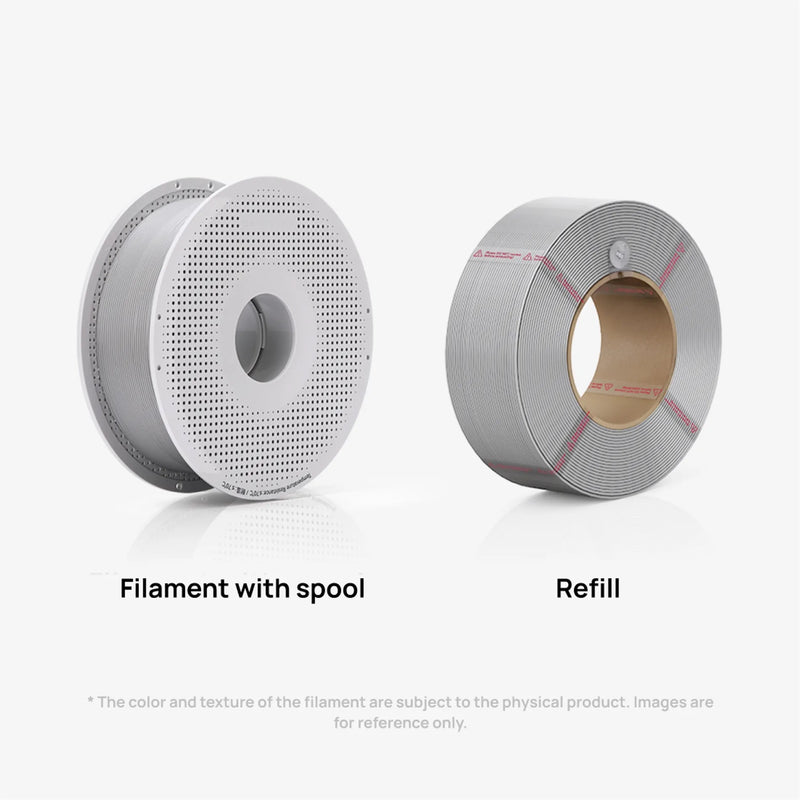
A refill does not include a spool. Choose “Filament with spool” if you need one. Choose “Refill” when you already have a compatible reusable spool ready to load. Bambu's product instructions explain how to secure a refill before removing its retaining strips; follow those instructions when loading it.
For a new setup, count the spools you actually own before filling your cart. For a repeat order, check which empty spools are available. Buying several refills will not help if all your reusable spools still hold other colours.
A practical four-colour shopping list
Instead of choosing four unrelated colours, plan around projects you will actually print:
- A dark neutral: for labels, accents and a consistent base colour.
- A light neutral: for contrast and a second option for everyday prints.
- One favorite colour: for the project you are most excited to start.
- A repeat or coordinating colour: choose a second roll of your most-used colour if that is more useful than variety.
These are shopping suggestions, not a fixed bundle. Check each product's colour, spool format and availability before adding it. If your next project only needs one roll, start there.
How NEX3D Canada filament bulk savings work
As of September 22, 2026, eligible filament rolls receive automatic savings at these quantities: 2 rolls: 5%; 4 rolls: 10%; 6 rolls: 15%; 10 rolls: 22%. Build your mix from eligible products and confirm the discount shown in your cart. Product eligibility and offers can change.
Canadian offers are shown on the product page and in your cart. Confirm eligibility and the final discount before checkout; US coupon codes do not apply to this store.
Quick answers before you order
Can I use PLA Basic and PLA Matte with AMS?
Bambu lists both standard materials as compatible with AMS and AMS lite. Check the instructions for your exact printer, feeding system and spool format, and select the matching material profile. Do not assume every specialty filament shares the same compatibility.
Should I buy a refill for my first roll?
Only if you already have a compatible spool. Otherwise, select filament with spool and save the empty spool for a later refill.
Should every roll in my order be a different colour?
No. A repeat of a colour you use often can be more useful than an extra colour without a planned project. Check the estimated material needed in your sliced project before deciding quantities.
Choose your next roll
Start with the finish, select a colour, and double-check the spool format. Then review any eligible bulk savings in your cart.
Explore filament at NEX3D Canada
Need help choosing? Tell us your printer model and what you want to make.