


Bambu Lab P1S Printer
Bambu Lab P1S Printer
Optional extended warranty Click to Expand
Product details
CSA & cUL certified — no additional charge
All printers sold by NEX3D in Canada come CSA and cUL certified, including the NRTL-approved label, at no additional charge.
Bambu Lab P1S Printer
Product Features
- Works right out of the box, set up in 15 minutes
- Well-polished hardware and software
- Enclosed-body for high-temperature filament printing
- Up to 16-color printing with AMS
- Up to 20000 mm/s² acceleration, prints a benchy in 18min
- Built-in camera for remote monitoring and timelapse
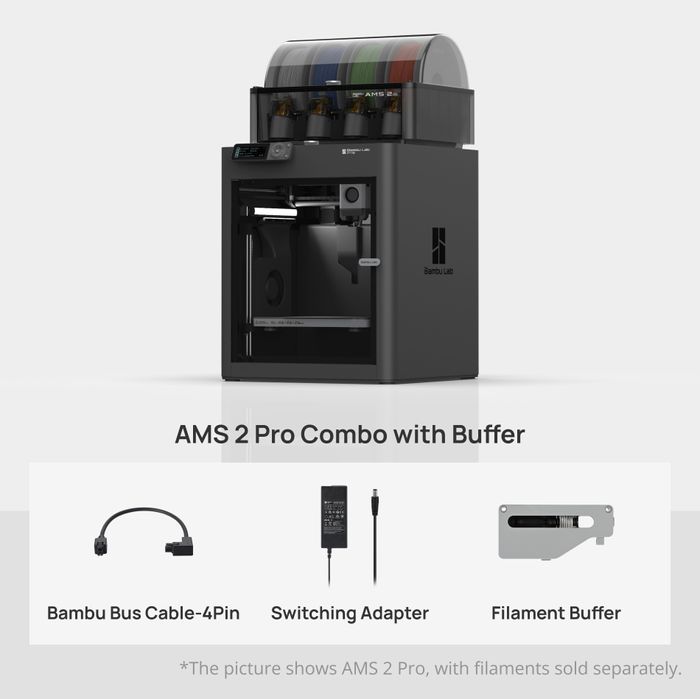
- The AMS 2 Pro is compatible with X1/P1 series printers for multi-material printing.
- * Cybersecurity compliant with EU RED Article 3.3(d)(e) and ETSI EN 303 645 V2.1.1:2020.


All-around performance right out of the box
It just works right out of the box. You don't have to mess with it, just simply hit print, and the printer will handle all the calibrations (Auto-Bed Leveling, Vibration compensation) for you. Enjoy trouble-free printing every time with your P1S.

Multi-color capability
Get the AMS combo to unleash Multi-color printing capability. (up to 16-color if you stack up 4 AMS units). Purchase additional AMS units for more colors.

Print fast with exceptional quality
Cutting-edge control algorithm with the help of vibration compensation and pressure advance, bringing you lightning-fast print speed without compromising on quality.

Fully loaded with advanced features


All advanced features of P1S printer: Learn more
Parameters Comparison
| P1P | P1S | |
| Build Volume(WxDxH) | 256 x 256 x 256 mm³* | |
| Shell | Open frame (Printable Modplates Available) | Enclosed (Plastic & Glass) |
| Hot End | All-Metal | |
| Nozzle | 0.4 mm Stainless Steel Included | |
| Max Hot End Temperature | 300 ℃ | |
| Nozzle Diameter |
0.4 mm (Included) 0.2 mm, 0.6 mm, 0.8 mm (Optional) |
|
| Build Plate Surface Compatibility |
Bambu Textured PEI Plate, Bambu Cool Plate, Bambu Engineering Plate, Bambu High Temperature Plate |
|
| Max Build Plate Temperature | 100℃ | |
| Max Speed of Tool Head | 500 mm/s | |
| Max Acceleration of Tool Head | 20 m/s² | |
| Control Board Fan | Optional | Closed Loop Control |
| Chamber Temperature Regulator Fan | Optional | Closed Loop Control |
| Auxiliary Part Cooling Fan | Optional | Closed Loop Control |
| Air Filter | Optional | Activated Carbon Filter |
| Supported Filament |
Ideal: PLA, PETG, TPU, PVA, PET Capable: PA, PC, ABS, ASA |
Ideal: PLA, PETG, TPU, PVA, PET, ABS, ASA Capable: PA, PC |
| Chamber Monitoring Camera |
Low Rate Camera 1280 x 720/0.5fps Timelapse Supported |
|
| Filament Run Out Sensor | Yes | |
| Physical Dimensions |
P1P:386 * 389 * 458 mm³, Package size 485 × 480 × 528 mm³, Net weight 9.65kg, Gross weight 14.30 kg |
P1S: 389 * 389 * 458 mm³, Package size 485 × 480 × 530 mm³, Net weight 12.95kg, Gross weight 17.60 kg P1S AMS Combo: Package size 485 × 480 × 585 mm³, Gross weight (AMS included) 21.60 kg P1S AMS 2 Combo: Package size 480 × 480 × 565 mm³, Gross weight (AMS included) 21kg |
| Electrical Requirements | 100-240 VAC, 50/60 Hz, 1000 W @220 V, 350W@110V |
*To prevent heatbed damage caused by collisions with foreign objects, the default printable height in Bambu Studio is set to 250mm. If you need to utilize the remaining 6mm of printable height, please refer to the safety instructions in this WIKI article .
*The collapsible filament cutter stopper will occupy part of the printing area when popped out. If you need to use the entire printing area, please follow the instructions in this WIKI article.

P1S AMS Combo add-ons

Bambu Lab AMS

Spare Filament Cutter (x2)

Bambu Bus Cable-6Pin

Bambu Bus Cable-4Pin

Bambu Filament Samples (Random Color/Type,Contains 2 spools)

P1S AMS 2 Pro Combo add-ons

Bambu Lab AMS 2 Pro

Bambu Bus Cable-4Pin

Switching Adapter

Filament Buffer

PTFE Tube Coupler
Frequently asked questions
1.What is the difference between P1S and P1P?
Compared to the P1P, the P1S offers a fully enclosed printing chamber and a more powerful cooling solution, which includes an Auxiliary Part Cooling Fan for cooling prints, a Chamber Regulator Fan to stabilize the inner chamber temperature, and a Control Board Fan to assist in cooling the control board. Furthermore, we have equipped it with an activated carbon filter to provide a solution for printing filaments such as ABS that are prone to emitting odors and harmful gases during the printing process.
For more information, please visit our official website or refer to the product specifications on our official wiki.
2.What is the difference between P1S and X1C?
P1S is based on the P1P with an improved cooling solution and enclosure. However, it is not recommended to directly print fiber-reinforced filaments such as glass fiber or carbon fiber, before an extruder and hotend upgrade is done. The X1-Carbon is equipped with Micro lidar for advanced AI detection functions and offers more convenient and efficient screen interaction.
3.I just ordered a P1P recently. Can I pay extra to replace it with P1S?
We offer an upgrade kit for upgrading from P1P to P1S. We recommend purchasing the upgrade kit for the upgrade. If you still want to replace the P1P with a P1S, please refer to the relevant return and refund policies on the web store accordingly.
The P1P will need to be returned for a refund, then you can place a new order for P1S.
4.I want to know the technical specifications of P1S. Where can I check it?
Download full technical specifications
Specifications
- Technology
- FDM / FFF
- Build volume
- 256 × 256 × 256 mm
- Enclosure
- Enclosed; plastic and glass shell
- Configurations
- P1S / P1S Combo
Choose your setup
The P1S gives NEX3D customers an enclosed CoreXY printer with a 256 mm working volume in each axis. Compare the P1S with the P1S Combo according to the material-system equipment you need. The enclosure provides a different printing environment from an open A-series model, while nozzle and filament compatibility still need to be checked for each project.
Before printing
- Select the exact configuration before ordering; product photography does not define included equipment.
- An enclosed body does not make every filament compatible; verify the nozzle, plate and material profile.
- Use the current printer and material profiles. Confirm nozzle, build plate and material-system compatibility for the exact filament before printing.
Ordering from NEX3D Canada
Prices are in CAD. See NEX3D shipping details and return policy. Contact NEX3D for product selection and compatibility help.
Choose your P1S package
The P1S is an enclosed CoreXY printer with a 256 × 256 × 256 mm build volume. Choose P1S for the printer alone, or a Combo for the material system specified in the option name. The P1S Combo includes the original AMS; AMS 2 Pro configurations are separate options where listed.
What should I compare before buying?
Compare the enclosure, material requirements and included AMS equipment. An enclosure helps with temperature-sensitive materials; ventilation and the manufacturer's material guidance still matter. Check the full part, supports and brim in your slicer.
Can I print abrasive filament?
Check the exact filament's nozzle and extruder requirements before using carbon- or glass-filled materials. Printer compatibility does not automatically mean compatibility with every AMS or feeder.
Read our P1S vs P2S buying guide or start with PLA Basic filament.
Delivery and availability
Prices are in CAD. Check the selected option's stock or dispatch message before ordering; a preorder dispatch date is not an arrival date. Review the Canadian shipping policy and return policy, or contact NEX3D to confirm a deadline.


Compatible add-ons
Verified accessories and materials selected for this printer. Choose the exact model or size on the add-on page.
Bambu Lab P1S Printer
-
Bambu Lab AMS 2 Pro - Automatic Material System
Vendor:Bambu LabRegular price $349.00 CADRegular price$449.00 CADSale price $349.00 CADSale -
Bambu Cool Plate SuperTack / SuperTack Pro
Vendor:Bambu LabRegular price From $49.69 CADRegular price$73.99 CADSale price From $49.69 CADSale -

-

Bambu Lab
Bambu Engineering Plate
A1 / P1 / P2S / X1
Regular priceChoose options$42.99 CADSale price$31.99 CAD -

Bambu Lab
Multi-Size Hotends Kit
X1/P1 Series / 0.2mm + 0.6mm
Regular priceChoose options$39.98 CADSale price$35.98 CAD -
Bambu PLA Basic Filament
Vendor:Bambu LabRegular price From $18.99 CAD From $14.81 CAD each at 10+ eligible rollsSale price From $18.99 CAD


